75% of knowledge workers say interruptions cost them more than an hour a day. That single fact shows how fragile high-cognitive performance is when attention is split.
This introduction frames the goal: show how people can design an environment so sustained concentration becomes the norm, not a lucky exception. The article will define the term, cite Cal Newport, and use findings on attention residue to explain why environment design trumps willpower.
The reader will get a clear promise: a classification system, scheduling models, physical and digital controls, and a repeatable session protocol that can be measured over time. Practical artifacts are coming — two comparative tables, checklists, policy templates, and tracking indicators for focus quality and recovery.
By treating focused effort as an operational system, the guide frames high-cognitive performance as producing hard-to-replicate value within limited time and capacity. Early sections reference execution frameworks such as the 4 Disciplines of Execution to anchor credibility.
Why deep work is becoming rare and economically valuable right now
Fewer people can hold long, uninterrupted concentration, yet that ability now defines economic value. Modern roles stack coordination, meetings, and inbox-driven responsiveness. The result is visible activity but weak output.
Cal Newport’s definition vs. the busyness trap
Cal Newport draws a strict line: deep work is cognitively demanding, distraction-free, and value-creating. If a task does not meet those criteria, it is shallow work—performative activity that looks busy but yields little lasting value.
Attention residue and the true cost of interruption
Behavioral research shows that a context switch leaves a portion of attention on the prior task. This attention residue reduces throughput and raises error rates.
One interruption can take up to 20 minutes to overcome. Two quick inbox checks can erase most of an hour of productive time.
What high-cognitive performance looks like
High-cognitive performance appears in tasks like strategy synthesis, complex writing, debugging, and design reasoning. These activities need sustained concentration to produce high-value outcomes.
Scenario: a project lead answers messages all day and attends many brief meetings. They feel busy but finish no substantive deliverable because micro-interruptions fragment their day.
- Contrast: inbox responsiveness vs. measured output.
- Measure: count uninterrupted time blocks and output units.
- Fix: reduce coordination overload and protect focused state.
“Sustained concentration produces work that is hard to replicate; interruptions turn scarce cognitive time into shallow tasks.”
Deep work vs. shallow work: a classification system readers can actually use
A clear classification makes it easy to decide which hours deserve undisturbed concentration and which belong to routine coordination.
Operational decision test: ask three questions for any task: does it require sustained concentration? Does it create new value? Can someone else easily replicate it? If yes to most, label it deep work. If not, label it shallow work.
Comparative view
| Criteria | Deep work | Shallow work |
|---|---|---|
| Impact | High | Moderate / operational |
| Replicability | Hard to replicate | Easy to replicate |
| Focus load | High attention | Low attention |
| Automation potential | Low | High |
| Career leverage | High | Low to medium |
Scenario mapping & calendar rules
One hour of writing is a high-value example. If notifications ping and the outline is unclear, the hour becomes shallow. If tools are set and goals are clear, it stays deep.
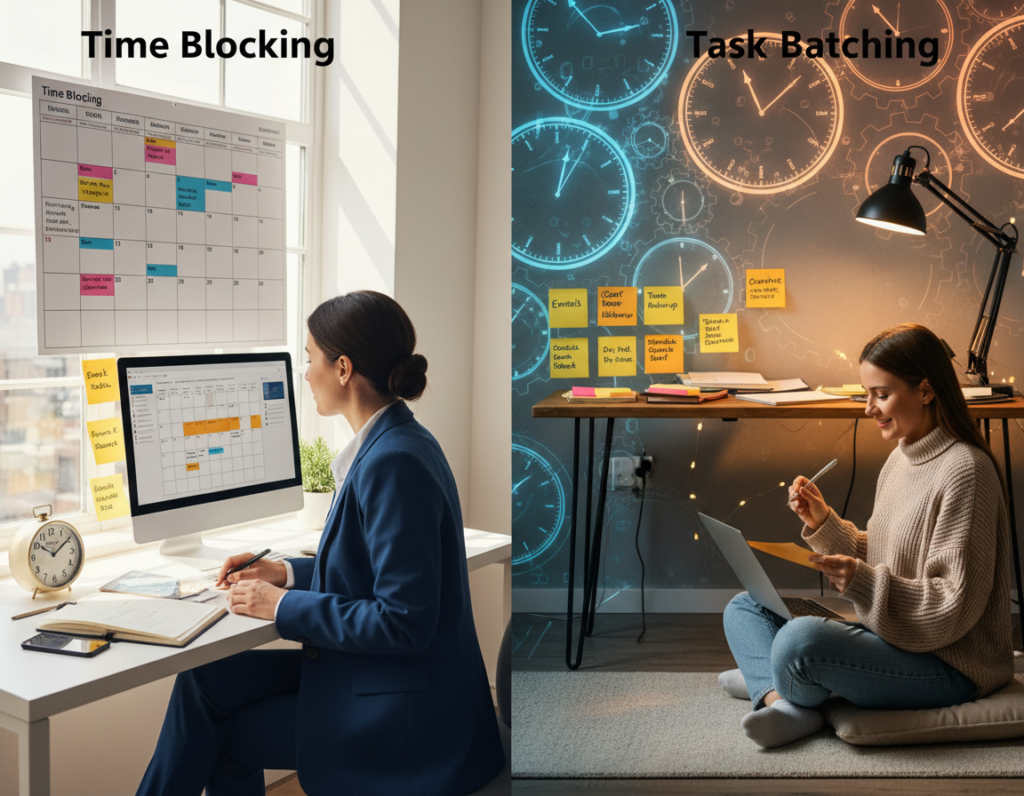
- Batch email and admin into shallow windows.
- Protect morning deep blocks from meetings by default.
- Weekly layout: two morning deep blocks, afternoon shallow windows, one meeting-cluster day.
“If a meeting lacks an agenda or outcome, treat it as shallow and shorten, make async, or cancel.”
Set a measurable target: how many hours of deep work per day is realistic
Realistic daily targets balance ambition with the brain’s natural decline in sustained attention. Most people can maintain true deep work for a limited number of hours before returns fall off.
The 1–4 hour guideline and what limits capacity
Evidence and common practice show 1–4 hours per day is achievable for most. Cognitive fatigue and diminishing returns make marathon sessions inefficient.
Start at 60–90 minutes per session and build to 2–4 total hours as the ability improves. Plan breaks to restore capacity and protect later time blocks.
Quality versus quantity: consistency compounds
Two consistent, high-quality hours each day beat an occasional six-hour marathon followed by burnout. Consistency produces steady progress and sustainable gains.
Productivity indicators to track
Track three lead measures:
- Deep hours: daily logged time in focused sessions.
- Output units: pages, PRs, designs or other deliverables shipped.
- Recovery quality: sleep, stress, and next-day focus rating.
| Daily deep time | One-sentence shipment | Recovery (1–5) |
|---|---|---|
| 90 minutes | Drafted proposal outline | 4 |
| 60 minutes | Reviewed PR and merged | 3 |
Team rule: negotiate role-based targets and measure over a week, not a single day, so productivity and progress reflect real capacity constraints.
Choose the right deep work scheduling philosophy for the reader’s role
Different roles need different calendars. The right model makes focus a repeatable habit and fits real constraints in daily life.
Monastic scheduling enforces maximum constraints: long, uninterrupted blocks with minimal meetings and messages. It fits authors, researchers, and IC builders. Risk: social isolation and missed opportunities.
Bimodal scheduling splits time into deep seasons and shallow seasons—full days or weeks for intense projects, then coordination periods. It suits product launches and dissertation phases. Risk: planning overhead and handoff friction.
Rhythmic scheduling protects daily blocks to build a steady habit. This is ideal for most knowledge people with predictable calendars. It lowers startup friction and scales well for teams.
Journalistic scheduling accepts opportunistic depth when calendars are unpredictable. It requires strict entry rituals and fast context loading. It fits executives, incident responders, and reporters. Risk: low beginner friendliness.
| Model | Calendar control | Interruption rate | Collaboration needs | Beginner friendliness |
|---|---|---|---|---|
| Monastic | High | Low | Low | Medium |
| Bimodal | Medium | Medium | Medium | Medium |
| Rhythmic | Medium | Low | High | High |
| Journalistic | Low | High | High | Low |
Apply this rule: choose by role, not prestige. Start with rhythmic blocks if unsure, and adapt toward bimodal or monastic during intense cycles.
“Scheduling is a tool; pick the model that protects your most valuable time.”
Environment design principles: how to make focus the default state
Designing the space around attention makes focused effort the path of least resistance. A behavioral design model treats desired behavior as easy and undesired behavior as costly.
Stimulus control means consistent cues that signal the brain to enter a concentration state. Same seat, same playlist, and a short pre-flight checklist create reliable triggers.
Behavioral design lens
Make the desired action easier by reducing startup friction. Increase friction for distractions by adding simple barriers that stop reflexive switching.
Cue stack example
Clear desk → open only the required document → start a timer → write the first “ugly draft” paragraph. This stack lowers the activation barrier and primes the mind.
Single-task architecture
One objective, one tool surface, one reference set. This prevents attention residue and reduces accidental switching during limited time blocks.
- No Slack tab, no email client, no phone on desk unless needed.
- Limit monitors and open windows to what the task requires.
- Use a visible checklist to lock the session goal.
Mini diagnostic
| Symptom | Likely cause | Simple fix |
|---|---|---|
| Can’t start | High friction | Shorten setup; 5-minute ritual |
| Starts then wanders | Missing cues | Create a cue stack |
| Repeating slips | Leakage to distractions | Add physical barriers |
“Design the way the room asks for focus, not distraction.”
A thoughtful physical setup shortens startup minutes and makes concentrated sessions routine.
Location consistency builds automatic cues. One primary spot, one backup, and a strict rule: no deep work on the couch. This protects stimulus associations so attention arrives faster.
Location strategy
Choose a main place for focused work and a second option for travel or shared days. Keep lighting and chair similar between them to preserve the same triggers.
Noise and interruption management
Noise-canceling headphones act as a visible cue. Post a simple sign: Do Not Disturb until 10:30. Use this script for interruptions: “I’m in a focused session; can we talk at 11?”
Desk ergonomics
Set screen at eye level, sit upright, and keep water nearby. Good posture and lighting extend concentration and reduce fatigue late in the day.
Materials readiness checklist
- Documents open and references downloaded
- Notebook, pen, water/coffee on hand
- One clear target written for the deep work session
Open office mitigations
Use zoning: collaboration rooms for talk, quiet zones for focus. Require bookings for focus rooms and default them to “quiet” unless reserved.
| Setting | Primary rule | Practical tip |
|---|---|---|
| Home | Dedicated desk space | Keep door closed; headphones on |
| Office | Book quiet room | Use visible sign and timer |
| Hybrid | One consistent spot at each location | Match chair height and screen level |
Example: a content strategist preloads outlines, sources, and style guide to remove setup excuses and start writing within minutes.
For more layout tips, see productive workspace design.
Digital environment controls: social media, phone, email, and notification policies
An intentional notification policy turns the internet from a constant interruption into a scheduled resource.
Make offline the default
Offline-first policy: schedule internet periods and avoid casual browsing outside them. Blockers run during focus blocks and are disabled only at set research windows.
Blocking strategy for research-only sessions
Use Freedom or SelfControl with an allow-list: Google Scholar, JSTOR, official docs, and API consoles. Block social media and news feeds during study blocks to prevent browsing loops.
Email batching and phone containment
Set email windows (example: 11:30 a.m. and 4:30 p.m.). This reduces attention residue from inbox-monitoring and protects continuous time.
Phone rules: Do Not Disturb on schedule, store the phone out of reach or outside the room, and allow emergency bypass for up to three contacts.
Tool overload costs and an implementation scenario
Every app switch adds coordination drag. Limit open apps to one primary editor, one browser with allow-list tabs, and one reference tool.
Scenario: a hybrid worker blocks social media during morning focus, checks emails at scheduled windows, uses DND, and tracks SLA responses to reassure collaborators.
“Treat internet access as a tool scheduled around focus, not ambient background noise.”
| Policy | Concrete rule | Enforcement |
|---|---|---|
| Offline-first | Blockers active during focus blocks | Automated schedules (Freedom) |
| Email batching | 11:30 a.m. & 4:30 p.m. | Auto-responder explains SLA |
| Phone | DND + out-of-room storage | Visible timer and sign |
Tool selection framework: the Craftsman Approach vs. the Any-Benefit Approach
A small, deliberate toolset beats an overflowing app drawer when protecting high-value tasks. The choice between two approaches determines how many interruptions a team tolerates.

Why the Any-Benefit Approach inflates tool sprawl
The Any-Benefit Approach keeps any app with a minor upside. That logic creates overlapping features and constant switching.
Result: more notifications, higher attention leakage, and lower overall productivity.
The Craftsman Approach: a goal-driven filter
The Craftsman Approach requires that a tool materially improve a small set of goal-driving activities.
Adopt only when positives clearly outweigh negatives. This protects time for focused sessions and reduces cognitive friction.
Audit matrix and decision rules
| Tool | Impact on goals | Decision |
|---|---|---|
| Editor | Positive | Keep |
| Social feed | Negative | Limit/Delete |
| Chat app | Neutral/Timed | Limit to urgent |
- Identify 2–3 goals: example—deep writing, problem-solving, shipping code.
- Rate each tool: positive, neutral, negative on those activities.
- Keep, limit, or delete based on net score and switching cost.
“Social media is allowed only in scheduled windows with a clear output purpose—distribution, recruiting, or research.”
Chat rule: use chat for time-sensitive coordination only. Make async documentation the default to protect focus.
Example: one team consolidated three tracking apps into a single system of record. Switching dropped, attention leakage fell, and output rose.
Deep work techniques for running a repeatable deep work session
A repeatable session is a small operational system that turns intention into measurable output.
Ritual design: duration, structure, rules, and requirements
Create a short ritual so starting is automatic. Pick one consistent location and set a fixed duration. Prepare materials before you begin.
| Deep Work Session Card | Value |
|---|---|
| Start time | 09:00 |
| Duration | 90 minutes |
| Single objective | Draft Section 3 (1,000 words) |
| Rules | Offline, phone away, no chat |
| Required materials | Outline, sources, notebook, water |
| Finish condition | First full draft or 1,000 words |
Time-boxing for intensity
Use tighter-than-comfortable limits to force prioritization. Treat short, intense intervals as attention interval training.
Start with 60–90 minutes. Then test 45-minute sprints for high-focus tasks. Shorter limits reduce drift and sharpen decision-making.
Output definitions: what “done” looks like
| Role | Clear finish | Example |
|---|---|---|
| Writing | Draft complete section | 1,000 words or outline-to-draft |
| Coding | PR merged with tests | Feature branch + passing CI |
| Strategy | Decision memo | One-page recommendation + next steps |
| Design | Two iterations | Mock + rationale note |
Break design: pause without reintroducing digital distraction
Keep breaks screen-free. Move, hydrate, and take analog notes if needed.
Limit breaks to 5–15 minutes so the brain resets but does not fragment attention. No social feeds or email during this time.
Session scoring: lightweight rating that doesn’t interrupt flow
At the end, record a 1–5 focus rating and one sentence on what disrupted the session. Do this once to avoid flow breaks.
- Example routine: 90 minutes writing, 10-minute screen-free break, 45 minutes revision.
- Log results: score, output produced, and next session plan.
- Schedule shallow tasks after logging to protect the next focus block.
“Make each session measurable: clear start, defined finish, simple score.”
When environment isn’t enough: grand gestures and intentional collaboration
When a standard setup still lets distractions win, teams can escalate to deliberate gestures and tighter collaboration to protect focus time.
Grand gestures that change incentives
Grand gestures are time-bound shifts in location or rules that signal importance. They raise the activation cost of avoidance and increase follow-through.
Options by budget include a library day pass, an offsite room booking, a weekend cabin, or a company-approved “deep sprint” day at home.
Bill Gates’ think week: an anchor example
Bill Gates’ think week is a real-world example of the isolation principle. He reduced inputs, read deeply, and produced strategic insight.
This model shows how fewer interruptions and fewer meetings free attention for synthesis and big decisions.
Collaborative focused sessions
Collaborative deep work can succeed if structured: 60–90 minutes, one clear problem statement, and a visible working surface like a shared doc or whiteboard.
Require no devices unless essential and keep an explicit finish condition for the task.
Meeting redesign to protect focus time
Redesign meetings with a checklist:
- Written agenda and pre-reads
- Defined decision or outcome
- Strict time-boxing
- Default to async updates when no discussion is needed
“Protecting focus time reduces meeting sprawl while preserving necessary collaboration.”
Execution and accountability systems that make deep work sustainable
Execution systems turn intention into repeatable output by making accountability visible and simple. They align daily practice with measurable progress and protect the hours that produce the most value.
The 4 Disciplines applied to individuals and teams
Map the framework: pick one wildly important outcome, act on lead measures (protected hours), keep a visible scoreboard, and meet weekly to inspect progress.
Choosing the wildly important
Select outcomes that change trajectory if achieved. Reject tasks that feel urgent but do not move metrics. Use a simple filter: impact, uniqueness, and time to result.
Lead vs. lag measures
Lead measures are weekly protected hours and session counts; lag measures are shipped deliverables. Tracking hours predicts output more reliably than only logging finished items.
Make a compelling scoreboard
Options: a visible wall calendar chain, a shared spreadsheet, or a small dashboard from time tools. The rule: keep it simple, public, and updated.
Cadence and tracking guidance
Run a 15-minute weekly review: log hours, note the top distraction, adjust the next schedule, and commit to blocks. Prefer passive tracking to reduce friction; if people use active logs, require a single end-of-session entry.
“Protecting lead measures—hours and clear sessions—turns schedule choices into predictable progress.”
Downtime as a performance requirement: shutdown rituals and recovery design
Intentional downtime is a core part of any sustainable productivity system. Rest helps the brain consolidate complex problems by letting the unconscious mind process patterns without active input.
Why rest improves thinking
When the conscious mind stops scanning for inputs, the brain continues to rearrange ideas and form connections. This offline processing often yields clearer solutions the next day.
How after-hours shallow work hurts recovery
Checking extra email or doing small tasks after hours keeps attention engaged. That prevents replenishment and reduces the ability to sustain focused hours the following day.
Shutdown ritual template
- Review open loops and capture next actions in one list.
- Schedule tomorrow’s two protected focus blocks and one shallow window.
- Clear the workspace, close tabs, and set a hard stop time (example: 5:30 p.m.).
- Put the phone away; allow only a defined emergency channel.
Recovery metrics to track
| Metric | Weekly target | Why it matters |
|---|---|---|
| Sleep duration/quality | 7–8 hours / consistent | Restores attention and learning |
| Perceived stress load | Reduce week-on-week | Predicts focus capacity |
| Next-day focus rating | 4/5 or higher | Links recovery to output |
“Treat recovery as part of the system: shut down clearly, protect the evening, and measure return on rest.”
Example day: two hours of focused deep work in the morning, shallow batching in the afternoon, shutdown at 5:30, then offline recovery to protect the next day’s ability to reach a high focus state.
Conclusion
Sustained gains come from small systems: classify tasks, schedule protected blocks, shape the physical and digital environment, and run a short session ritual with clear outputs and scoring.
Contain shallow work so it does not fragment focus. The practical trade is containment, not elimination. That approach preserves hours for high-value tasks and makes progress measurable.
Seven-day starter: pick a scheduling philosophy, set a 1–2 hour daily target, enable an offline-first rule for focus blocks, and complete five scored sessions this week.
Three examples to start tomorrow: a 90-minute writing block, a research-only allow-list in the browser, and a shutdown ritual with a hard stop time.
For authority and retention, embed a “deep work session walkthrough” and a “time-blocking masterclass” video on the page. These support learning and provide review-ready assets for teams.
Final note: the best way to build a deep work habit is consistency in schedule and environment, not heroic bursts. Small, repeatable actions compound into stronger skill, faster learning, and higher-quality output.